Introduction
archNEMESIS is an algorithm designed to 1) generate a forward model of the spectrum of a planetary atmosphere based on a set of input parameters, and 2) perform atmospheric retrievals, by which some of the input parameters are iteratively modified until the simulated spectrum best fits the measured one.
The code can be divided in four high-level parts:
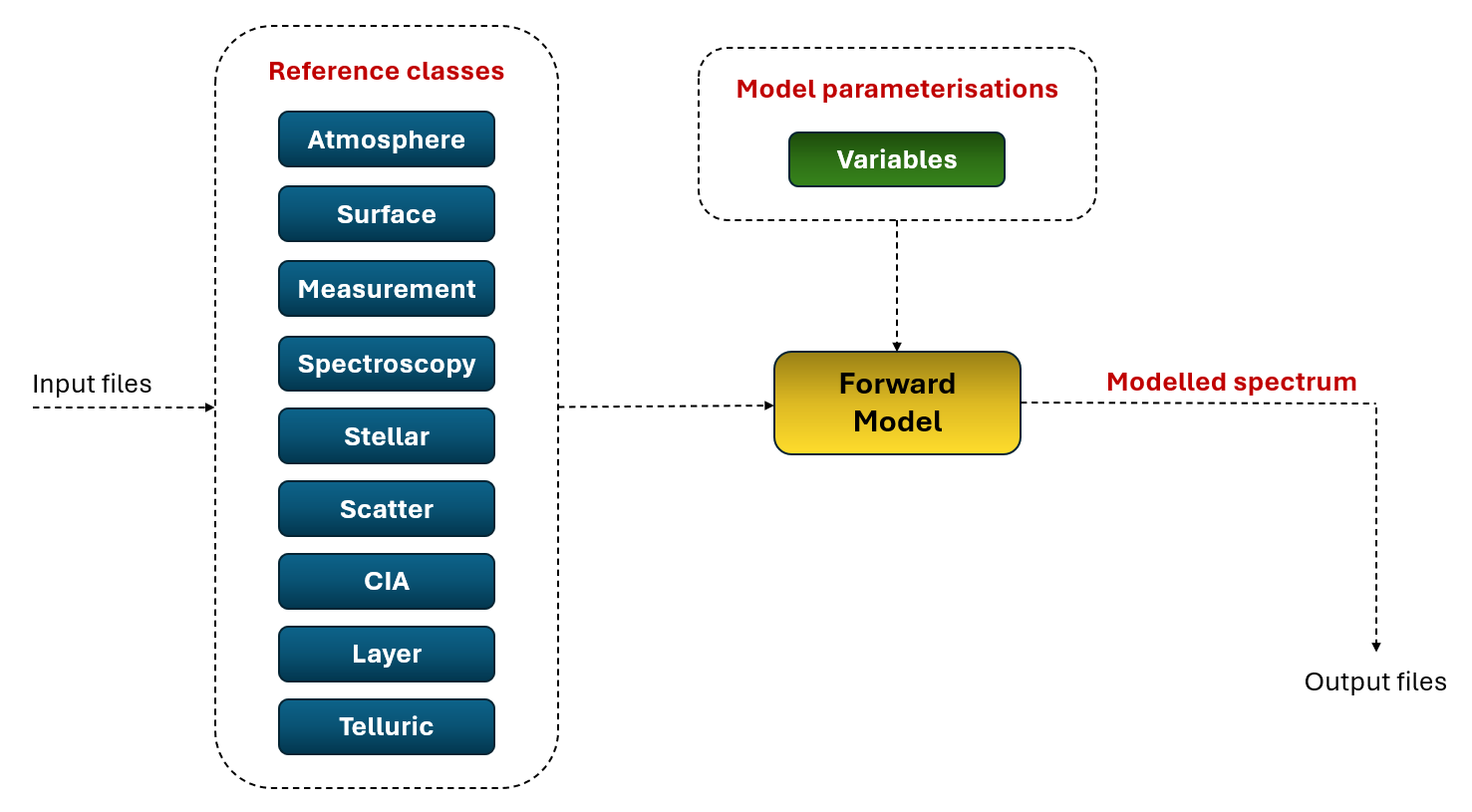
Reference classes: These classes include all the input information we require to model the electromagnetic spectrum of a planetary atmosphere, starting from the atmospheric and surface properties of the planet, to the geometry and specifics of the instrument response we want to simulate.
Model parameterisations: These are a set of parameters that are iteratively modified in our model to find the best fit between the modelled and measured spectrum. In atmospheric retrievals, these variables are more generally known as the state vector.
Forward Model: It refers to the set of functions that solve the radiative transfer equation and allow the calculation of the spectrum based on the model inputs and parameterisations.
Retrieval engine: It refers to the algorithm or methodology to solve the inverse problem – search for the set of model parameters that produce a best fit between the modelled and measured spectrum.
The figure below shows a high-level schematic of the structure of archNEMESIS for a forward model simulation. In the following sub-sections, we describe each of these parts in more detail.
Input files
The information in archNEMESIS is generally read from a set of input files with a required specific format. There are two versions of the files that can be used, one using the existing standard NEMESIS input files, and another one specifically designed for using archNEMESIS.
Standard NEMESIS files
NEMESIS reads the information from a set of text files with a specific format. Here we list the format of such required files.
.set file
- Short description: Contains details of the scattering angles to be used and also how the atmosphere is to be split into layer .
- How to read/write: This file can be read/written using the read_set() and write_set() functions in Files.py.
.inp file
- Short description: Contains different general details of the model simulation.
- How to read/write: This file can be read/written using the read_inp() and write_set() functions in Files.py.
.fla file
- Short description: Contains different flags to turn on/off different options.
- How to read/write: This file can be read/written using the read_fla() and write_fla() functions in Files.py.
.ref file
- Short description: This file includes the reference gaseous atmospheric profiles, containing the temperature, pressure and gas volume mixing ratios as a function of altitude. The units of the altitude, pressure and temperature field are in km, atm and K, but an automatic conversion is applied when reading/writing the files to the units of the Atmosphere class (m, Pa, K).
- How to read/write: This file can be read/written with the Atmosphere.read_ref() and Atmosphere.write_ref() methods.
aerosol.ref file
- Short description: This file includes the reference aerosol atmospheric profiles, containing the aerosol specific density as a function of altitude. The units of the values listed in this file are in particles per gram of atmosphere.
- How to read/write: This file can be read/written with the Atmosphere.read_aerosol() and Atmosphere.write_aerosol() methods.
parah2.ref file
- Short description: Reference para-H2 fraction profie (i.e., amount of para-H$_2$ divided by the total amount of H$_2$). Note: This file only needs to be present if the planet under consideration is a giant planet and the calculation is in wavenumbers. If it is in wavelengths it is assumed to be in the near infrared, in which there is not yet a tabulation of how CIA varies wit ion.
- How to read/write: This file can be read/written with the Atmosphere.read_parah2() and Atmosphere.write_parah2() methods.
.spx file
- Short description: Contains most of the information regarding the measurement. In particular, it includes information about the measured spectra and the geometry of the observation.
- How to read/write: This file can be read/written using the Measurement.read_spx() and Measurement.write_spx() methods.
.sha file
- Short description: If the spectral resolution of the instrument in the .spx file is positive (i.e., FWHM>0), then this file needs to be present. It just indicates the shape of the instrument function, defined by Measurement.ISHAPE.
- How to read/write: This file can be read/written using the Measurement.read_sha() and Measurement.write_sha() methods.
.fil file
- Short description: If the spectral resolution of the instrument in the .spx file is negative (i.e., FWHM<0), it indicates that the instrument lineshape is represented by a user-defined function at each wavelength of the spectrum. The .fil file provides information about this instrument function using the parameters NFIL, VFIL and AFIL of the Measurement class.
- How to read/write: This file can be read/written using the Measurement.read_fil() and Measurement.write_fil() methods.
.lls or .kls file
- Short description: This files include a list of the pre-tabulated look-up tables with the information about the line-by-line absorption cross sections of the gases (.lls file), or the k distributions (.kls file).
- How to read/write: These files can be read with the Spectroscopy.read_lls() and Spectroscopy.read_kls() methods. The user needs to write these files, but there is not specific format for this, each of the lines in the file correspond to the path of each of the pre-tabulated look-up tables.
.sol file
- Short description: Contains information regarding the stellar spectrum to be used.
- How to read/write: This file can be read/written using the Stellar.read_sol() and Stellar.write_sol() methods.
When using archNEMESIS to run a forward model or a retrieval using these inputs, the fastest and easiest way of reading all the inputs and properly feeding this into the reference classes is by using the read_input_files method.
import archnemesis as ans
Atmosphere,Measurement,Spectroscopy,Scatter,Stellar,Surface,CIA,Layer,Variables,Retrieval = ans.Files.read_input_files(runname)
HDF5 archNEMESIS file
In addition to the standard NEMESIS files, a specific version of the input files for archNEMESIS has been designed. The information is essentially the same, but the format of the files benefits from a tailored structure for this version. In particular, a forward model or retrieval in archNEMESIS can be run by reading information from a single HDF5 file. This file format allows the organisation of the data in a hierarchical manner using groups and datasets. This format is particularly useful for the structure of the inputs from archNEMESIS, since each of the reference classes corresponds to a unique group within the file, which includes all the information (i.e., datasets) for that particular class.
All classes include read_hdf5() and write_hdf5() methods to easily read and write the archNEMESIS HDF5 file. In addition, these methods include an assessing function to check the validity of the information within the class (i.e., see if there are any conflicting flags). In addition, these methods write metadata to easily visualise the contents of the file (i.e., includes of explanation of each variable in the file, units, and selected flags). HDF5 files can be visualised by using specific software. If using Visual Studio Code, we recommend using the H5Web extension to easily read the contents. Otherwise, HDF5 files can be explored using software such as Panoply or HDFView.
In the case that the HDF5 file includes information about all the classes required to run a forward model or retrieval, then all inputs can be simultaneously read by using the function:
import archnemesis as ans
Atmosphere,Measurement,Spectroscopy,Scatter,Stellar,Surface,CIA,Layer,Variables,Retrieval,Telluric = ans.Files.read_input_files_hdf5(runname)
Output files
Similarly, once a retrieval or forward model simulations has been performed, the output information is written into a set of output files, either following the standard NEMESIS formats, or the archNEMESIS HDF5 one.
Standard NEMESIS files
NEMESIS writes the information from a retrieval simulation into a set of text files with a specific format. Here we list the format of such required files.
.mre file
- Short description: Contains the main information regarding the best fit to the spectrum, as well as the retrieved parameters.
- How to read/write: This file can be read using the read_mre() function in Files.py.
.cov file
- Short description: Contains diagnostic metrics useful for the analysis of Optimal Estimation retrievals, such as the Jacobian matrix, gain matrix, averaging kernels, or error covariance matrices.
- How to read/write: This file can be read using the read_cov() function in Files.py.
HDF5 archNEMESIS file
If the retrieval with archNEMESIS is run using the HDF5 file format, then the outputs are written into the same file. In particular, the outputs will be written into the Retrieval section of the HDF5 file.
The best fit to the spectrum can be easily read using the read_bestfit_hdf5() function stored in Files.py. In particular, this function will return the Measurement class from the file, but will also include an extra parameter called SPECMOD, containing the best fit modelled spectrum, which can be directly compared with the MEAS measured spectrum.
The retrieved parameters can be easily read using the read_retparam_hdf5() function stored in Files.py. This function will return the prior parameters included in the .apr file, as well as the retrieved parameters for each model parameterisation.